Spreeder is a powerful speed-reading platform designed to help users read faster, retain more information, and improve overall productivity. Grounded in cognitive science and supported by ongoing research and development, Spreeder offers a personalized, effective reading experience for learners, professionals, and lifelong readers alike. The platform continues to evolve with new features, enhancements, and tools to make reading more efficient and enjoyable. Here are the latest updates:
What’s New?
eReflect Streaks
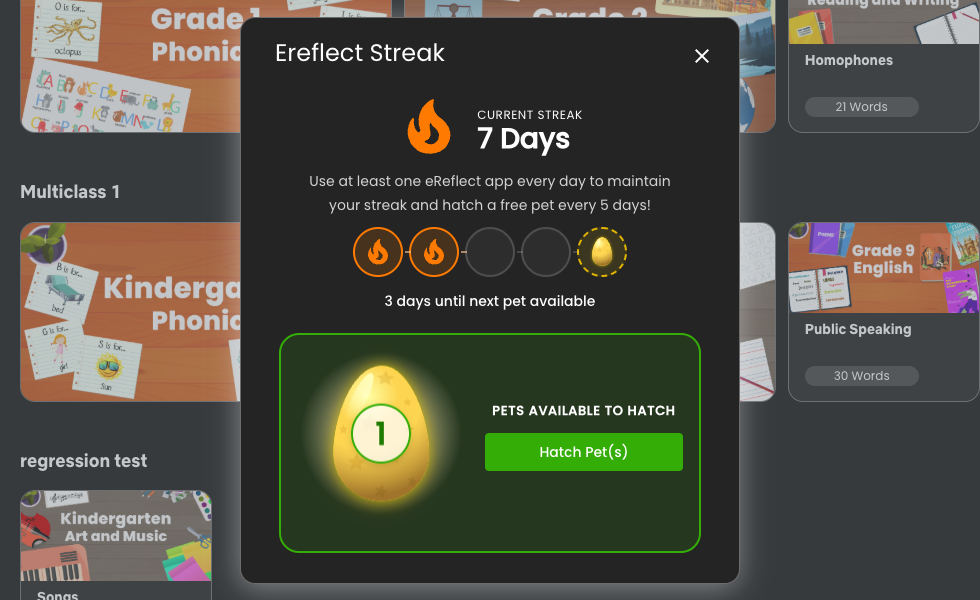
- One streak across every eReflect app: A new daily streak now runs across the whole eReflect platform. Every reading session counts toward the same streak, so learners can keep it going day after day.
- Progress at a glance: A streak badge in the web toolbar and a streak pill on the Profile open the Streak dialog, which shows the current streak and progress toward the next pet egg.
- Earn pet eggs: Every 5 days added to a streak earns a pet egg. Eggs hatch from the Streak dialog with the pet reveal animation, and the new pet appears in My Pets right away. Breaking the streak resets the eggs.
- Shown only when it matters: Streak badges stay hidden at a zero streak unless there are eggs waiting to hatch. Accounts without pets do not see the egg card.
- Always up to date: The streak refreshes after an activity result is saved and whenever the user returns to the app.
This feature applies to all Spreeder Accounts.
Easier Access and Clearer Account Messages
- Free version instead of a dead end: An account user without a subscription for the app they open now gets the free version of that app. Locked content is marked Not Included and explains what to do next, such as contacting support or asking the account owner, instead of offering an upgrade.
- Clear access notices: A notice at the bottom of the web app (an alert once per session in the mobile apps) lets users know when they are on the free version or when the account has expired or is paused. The web notice can be dismissed.
- Simple renewal for expired accounts: Expired VIP, Homeschool, and Business accounts now see a renewal dialog. Users who can renew get a Renew button (or a link to the App Store or Google Play page in the mobile apps), while others see who to ask or a Contact Support button. The dialog also includes I’ve renewed / Check again and Sign Out.
- Discover more from eReflect: In the mobile apps, Profile options now include links to the store pages of other eReflect apps.
This feature applies to all Spreeder Accounts.
User Experience Updates
- Texts always open: A locked saved reading mode no longer stops texts from opening. Spreeder now switches to an available reading mode instead.
- Smoother restart after a session ends: The mobile apps now restart from the start screen after a session expires.
- Settings show the right value: Mobile settings rows now show the saved value right after it changes.
- Icons restored: Missing icons in the mobile apps are back.
- High Contrast improvements: The Back button color and background and the mobile layout have been fixed in High Contrast mode.
- Better Extra Large text support: Cards keep the right height with Extra Large text, the collapsed menu displays correctly, and the Finish button is properly aligned.
This feature applies to all Spreeder Accounts.
Looking Ahead
Every Spreeder update is focused on helping users make the most of their reading time. This October, that means a new streak that rewards daily reading across every eReflect app, clearer account messages, and a smoother, more reliable experience on every device, making it easier to get into Spreeder and stay focused on reading.
There’s more ahead. As Spreeder continues to evolve through ongoing research, development, and user feedback, the focus remains on creating a faster, more effective, and more enjoyable reading experience for learners, professionals, and lifelong readers.