
Wordela is a dynamic, continuously evolving platform backed by a dedicated team of engineers, educators, curriculum specialists, and UX designers committed to delivering meaningful updates that enhance both teaching and learning. Here’s what’s new:
Learn Vocab Questions Read Aloud
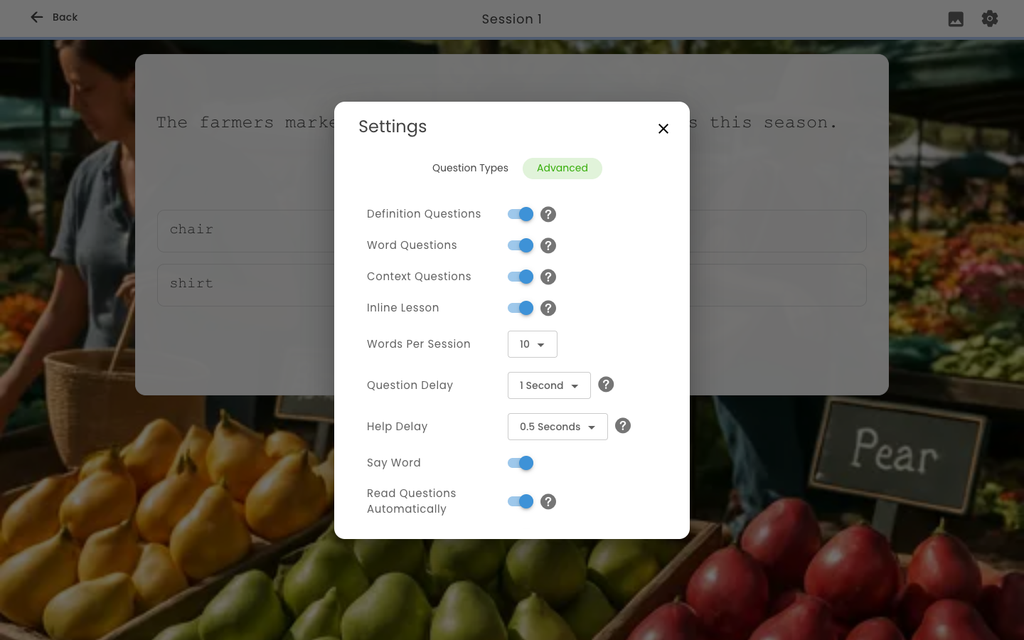
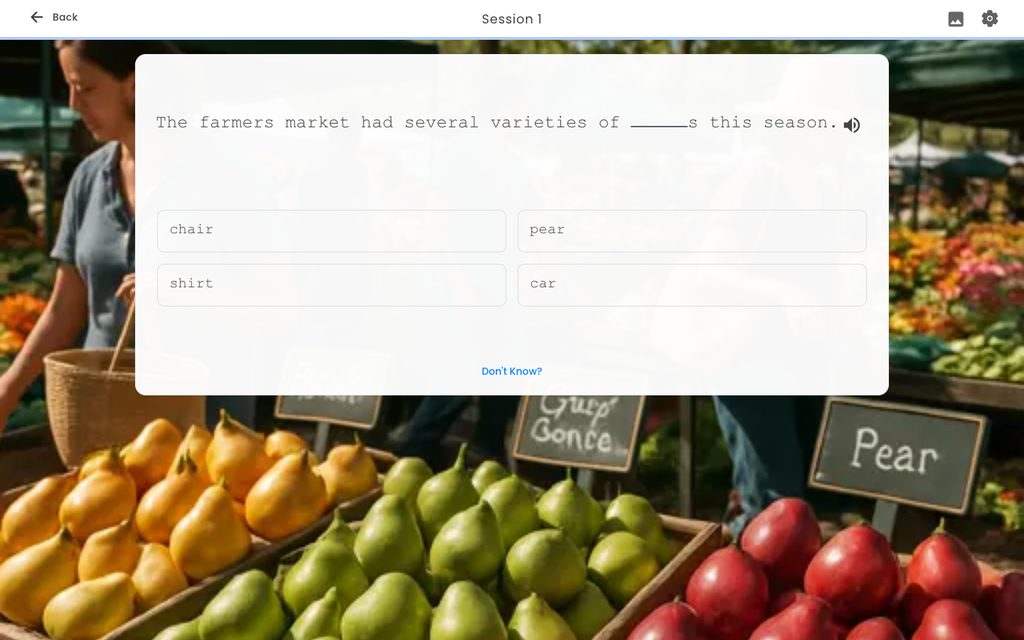
- Questions can now be read aloud: When enabled, each new question is read automatically. A speaker button also appears when hovering over a question or answer, so students can replay it anytime.
- All question types are supported: Definition, word, and usage-example (context) questions are supported, including AI-generated answer options.
- Words highlight as they are spoken: Text highlights word by word to help students follow along. Recorded audio uses its actual word timing, while synthesised speech follows its speech timing.
- Natural recordings are preferred: Available recordings are used for definitions, words, and usage examples instead of a computer-generated voice. Context questions also prioritize example sentences with recordings, rather than choosing from the ten available sentences without checking for a recording.
- Answers stay hidden: In usage-example questions, the answer is replaced with a short tone. For example: “The engine is a crucial” + [tone] + “of a car.” The system also removes regular, y-to-i, and e-drop forms of the answer before reading. If a recording cannot be verified, it is not used and a safely modified synthesised version is played instead. Recordings with the tone already included are played as provided.
- Correct answers are read aloud: After a student selects the correct answer, the word is read back to them. This only happens for correct answers.
- Students can control the setting: A new Read Questions Automatically switch is available across all four Wordela settings areas on web and mobile. If an administrator has set the option, students can still see it, but it is disabled and shows the selected setting and why it cannot be changed.
- Flexible class settings: Read Questions Automatically can be set to On, Off, or Student Selected. A setting for an individual student takes priority over the class setting, which takes priority over the student’s personal choice. Student Selected lets the student choose.
This feature applies to all Wordela Accounts.
Wordela Basic (Freemium) in the Wordela App
- Basic (free) tier support: The Wordela app now supports the same Basic tier as the admin interface, giving Basic schools a consistent experience.
- Premium content is clearly marked: Locks appear on premium word lists, categories, and topics. Categories with both free and premium lists remain open, with locks shown on individual premium lists. Content assigned to the class is never locked.
- Easy Premium upgrades: Teachers and admins who open locked content or reach the custom word list limit see the Upgrade to Wordela Premium dialog. It shows Premium benefits, why the upgrade is needed, the school’s state when available, and an optional message. Submitting the form sends a territory-routed sales lead to the CRM.
- Students see an informational message: Students never submit sales leads. Instead, they are asked to speak with their teacher about Wordela Premium.
- Custom word list limits are checked first: Teachers at the limit see the upgrade prompt before creating a list that would be rejected. Premium content and limit errors from the server also show the same upgrade prompt instead of a generic error.
- Upgraded accounts unlock automatically: Basic locks are removed after the next login or sync once an account has full access.
This feature applies to all Wordela Accounts.
Wordela Class Reports – “All” Option and Assigned-Only Content
- View all class progress at once: Class Vocabulary Progress and Class Spelling Progress now include All Word List Sets and All Word Lists, similar to the Typesy Curriculum Progress report. Reports open to All by default, with progress columns showing totals across all assigned lists.
- See only assigned content: The set and word list options now include only content assigned to the class. Whole-set assignments include the full set, while individual-list assignments include only those lists within their set.
- Easier content filters: Set and word list filters are now in the report header and match the portfolio filters, with search, option rows, Clear all, and Clear filter controls. Press Escape to close the filters.
- Clearer table layout: Column headers stay visible while scrolling and align with the Individual Student Performance table for consistent text and positioning.
- More accurate progress tracking: Wordlist Started now counts a list as started when any progress exists. This prevents a dash from appearing next to a non-zero mastered count. Students with no progress remain visible with dashes, while the empty state appears only when no student has any progress in the selected content.
This feature applies to all Wordela Accounts.
Stay Logged In (Perpetual Login)
- Stay signed in longer: Users can now stay signed in for up to 30 days, including after closing and reopening the browser or tabs. The actual session length is still limited by the server, so short-term sessions such as impersonation still end as expected.
- Logging out fully signs out the account: Logging out now clears both the local session and the shared eReflect session, preventing the next person using a shared computer from being signed back into the previous account.
- Temporary connection limits are handled automatically: If the app temporarily cannot refresh the session, it waits and retries instead of sending the user to the Accounts site.
- Safer and smoother logout: Open dialogs close before logout. Return to Admin restores the administrator’s own session before closing the student view.
- Clear message when a session ends: If a session is ended because the account is signed in on too many devices, the app now shows a session message explaining what happened instead of failing silently.
This feature applies to all Wordela Accounts.
Multi-Class Homescreen: Shared Assignments and Cleaner Rows
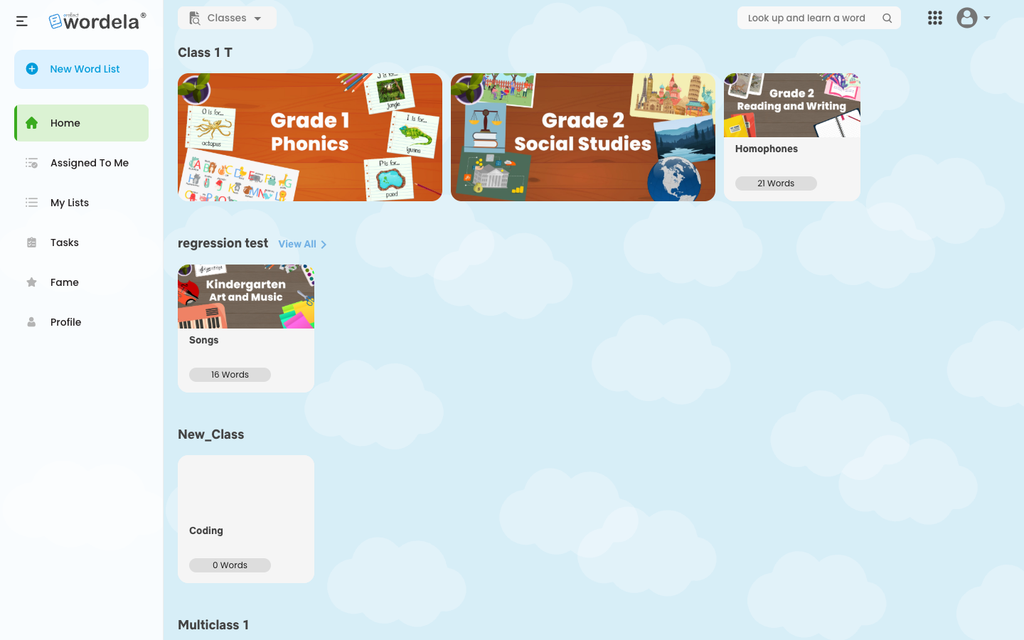
- Shared assignments appear once: Content assigned to two or more of a student’s classes now appears once in an Assigned from multiple classes section instead of being repeated in each class row. This applies to Typesy curriculums and courses, as well as Wordela word lists and sets.
- Cleaner class rows: A class row is hidden when it has nothing assigned for the product being used, or when all its assignments appear in the shared section. If nothing is assigned across all classes, students see one empty message without class headings. Hidden classes remain available in the Classes dropdown and View All.
- EDU students see assigned content only: EDU students no longer see the Wordela Recommended row. Only assigned content is shown.
This feature applies to Wordela EDU and Homeschool Accounts.
Wordela Portfolio – Derived Word Forms Are Recognised
- Derived word forms are now recognised: The portfolio editor previously credited a target word only when the student entered an exact match. Now, forms such as running for run, or tasted and tastes for taste, are recognised and highlighted as credited.
- More word forms are covered accurately: The matcher handles regular inflections, plurals, y-to-i changes, and silent-e changes. It credits a base word only when that word exists on its own, so daunting credits daunt, while remuneration does not credit the non-word remuner. Across the Wordela library, this credits about 12% more genuine derived forms without reducing accuracy.
This feature applies to all Wordela Accounts.
Branded Start-Up Screen
- A branded screen now appears while the app loads: Web apps show a branded splash screen instead of a blank page and remove it as soon as the first screen is ready.
- Clear loading feedback: If start-up takes longer than expected, the regular loading spinner appears. The splash screen also closes before any dialog appears and does not show during native serving.
This feature applies to all Wordela Accounts.
Admin Interface Updates
- Activity Font: Now supports three class settings: On forces a font and size, Off uses Default/Normal, and Student Selected lets students choose. The student app supports all three, updates the row when the class setting changes, and hides it when there is nothing to choose.
- Subscriptions: Resubscribe now renews the product shown on the card instead of routing to Upgrades. It does not show a price when data is incomplete or below the offer’s seat allowance, and cards refresh after renewal. Change Payment Method now uses a single call.
- Reports: Curriculum Progress, Vocabulary/Spelling Progress, and Students tab reports include only class students and exclude class leaders. Student drill-downs follow the selected set and word list, and numeric columns sort numerically. Empty or failed reports no longer export silently. Class Grading, Curriculum Progress, and word list PDF exports were fixed, including headers-only PDFs, clipped pages, and the Hall of Fame School column in school mode.
- Classes and users: Class-wide accuracy goals can be saved without individual goal toggles overwriting them. The Users table reads and sorts the Admin column from the user type. Edit User keeps email optional, clears the password placeholder on click, and keeps the Type of User dropdown open. SSO users can be deleted except Clever and ClassLink users. Removing a student refreshes the Classes tab, search skips pagination padding rows, and the district/school rename dialog is fixed.
- Content: The Select Content picker now shows existing word lists and restores Generate with AI and Create. The Assign Word List dialog stays open after assigning and shows the assignment state on the library card. The Hall of Fame Class option was retired, and the school banner is now shown by board rather than viewer preference.
- Presentation and accessibility: The product header uses the neutral eReflect mark when no single product applies. Legacy dropdowns in Import Users and Class Settings now use the current menu component. Dark and High Contrast modes are corrected across leaderboards, reports, class settings, bulk assign, and the Activity Font preview.
This feature applies to Wordela EDU and Homeschool Accounts.
User Experience Updates
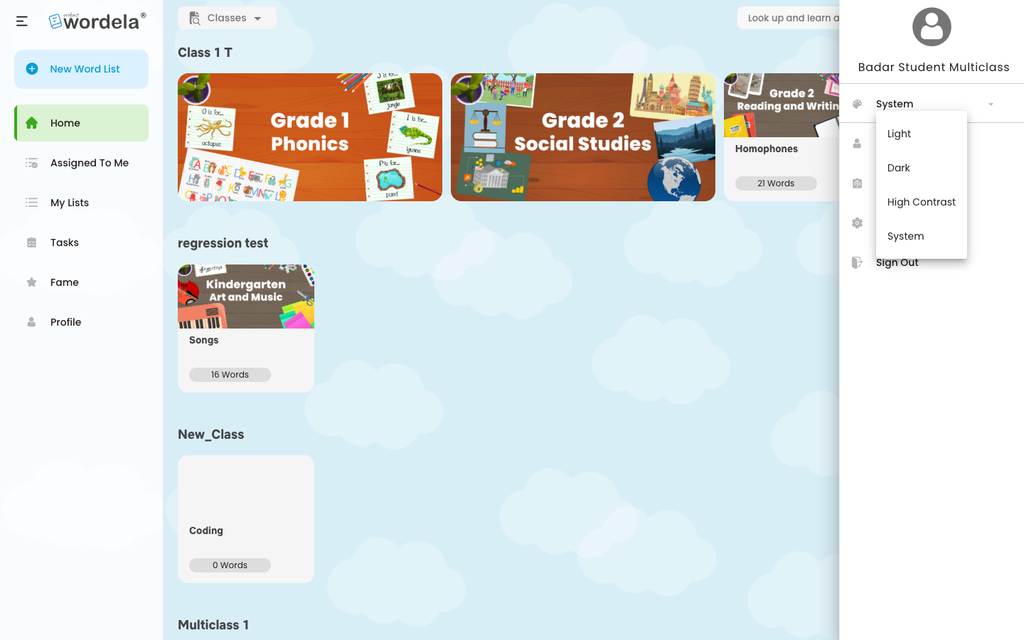
- Simpler theme names: Theme options are now consistently called Light, Dark, High Contrast, and System across the web. The “Theme” suffix has been removed from all nine theme menus and their triggers.
- Consistent category hover effects: Wordela library category cards now use the same hover shading as curriculum and course cards.
- Clearer word list cards: The link cursor no longer appears over non-clickable parts of word list cards.
- Safer student enrollment: Remove from other classes is now off by default in the legacy admin. Its label and tooltip match the behavior, so enrolling a student in another class no longer silently removes existing classes. Enrollment now runs after removal completes and reports what actually happened.
- Silent keyboard clicks: When a class forces Sound off, keyboard clicks are silent everywhere, including activities launched from Recommended Goals.
- Accurate course progress: The web Contents dialog now respects step locks, and curriculum section checkmarks update as students complete work instead of only after a refresh.
- Smoother pet reveal: Pressing Enter on the pet offer end screen no longer skips the reveal, and the Redo button is no longer hidden behind it.
- Improved Word Scroll: Word Scroll now shows the correct display name and correctly times partial subtitles. Capitalised entries resolve their word images and audio, and British-spelling conversion no longer changes course image filenames.
- Saved Word Info preferences: Word Info now remembers the selected genre, so cancelling the dialog cannot overwrite a student’s saved preference.
- Better printed certificates: Certificate box fills are preserved when printed, and skill-level and goal boxes are centred within their containers.
- More reliable word list storage: Word list renames now persist in the local cache, and corrupt stored lists are removed instead of stopping the entire restore.
- Cleaner definitions: Definitions in languages written without spaces no longer receive stray spaces in lesson cards.
- Improved iPad focus: Activities on iPad now take keyboard focus when loaded, and Contents padlocks no longer flash when opened.
This feature applies to all Wordela Accounts.
Platform and Housekeeping
- Updated Android support: Wordela now targets API 36, and unused geolocation permissions were removed from all iOS and Android projects.
- Updated components and product data: Activity plugins are now v1.5.33, and the product data version is 2026.09.14.
This feature applies to all Wordela Accounts.
Wordela Settings
- Customize Activity Appearance: Turn a custom font on or off, choose the font family and size, and preview the changes live so classes can use a typeface that suits their readers.
- Choose activities: Enable or disable Learn Vocab, Learn Spelling, Word Scroll, Flashcards, Review, and Zspell. At least one activity must remain enabled.
- Set individually or in bulk: Apply both settings per student from the gear on the user page or to multiple students from the Classes toolbar.
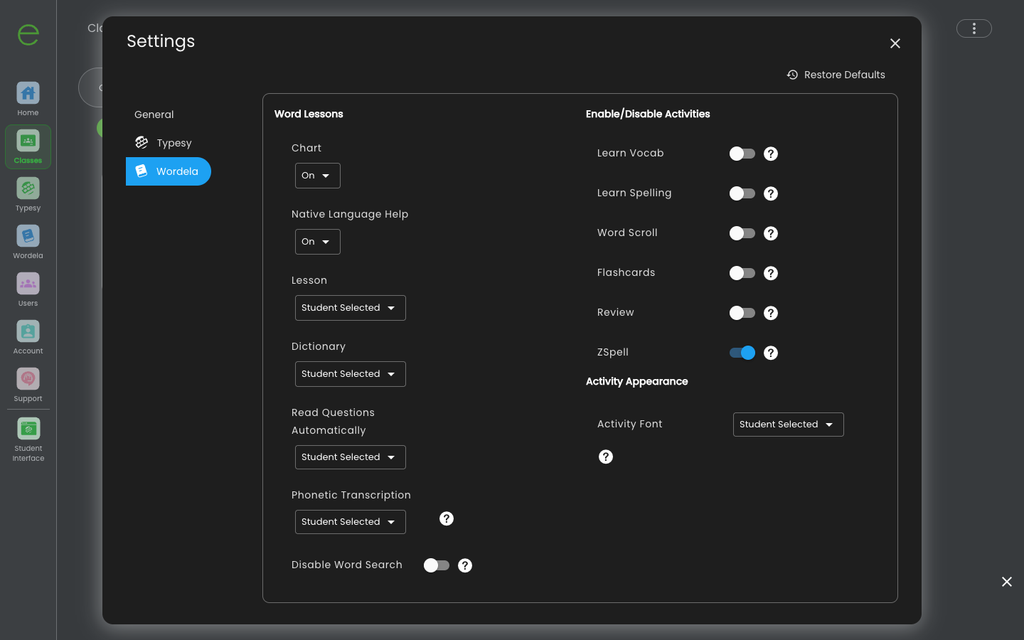
This feature applies to Wordela Homeschool and EDU Accounts.
Wordela Freemium Content and Creation Limits
- Clearer free-tier limits: The free Wordela tier now has access to a limited share of the library. Premium topics and categories show a lock, while freemium teachers have limits on custom word lists, tests, and assignments. The server enforces these limits, and the apps show the lock, limit message, and upgrade path.
This feature applies to all Wordela Accounts.
More Usage Example Audio
- More natural example audio: More recorded usage-example sentences are now available for every word. The apps prefer examples with recordings, so students see natural-voice sentences before older, lower-quality examples.
This feature applies to all Wordela Accounts.
Wordela Library Navigation
- Quick return to the library: Clicking the library heading now always returns to the root of the Wordela Library.
This feature applies to all Wordela Accounts.
Looking Ahead
Every Wordela update is guided by one goal: making vocabulary learning easier to manage and more meaningful for students. This release brings more flexibility for educators, clearer ways to manage content and activities, richer audio support, and smoother experiences across devices helping teachers create the right learning environment while giving students more ways to engage with words.
There’s more ahead. As feedback continues to shape the roadmap, Wordela will keep improving the tools, content, and learning experience that support vocabulary growth making it easier for educators to guide learning and for students to build confidence with every word.